1.5. Appendix: Monte Carlo C++ Program
Where to run the C++ code
You can run this exercise on noto.epfl.ch
Open noto.epfl.ch and then wait until the session is initalized.
In the left panel, create a new folder and navigate to it.
Then use the launcher to open both a terminal and a new file.

You can use the tabs to switch between them or place them alongside each other by dragging one of the tabs to the left.
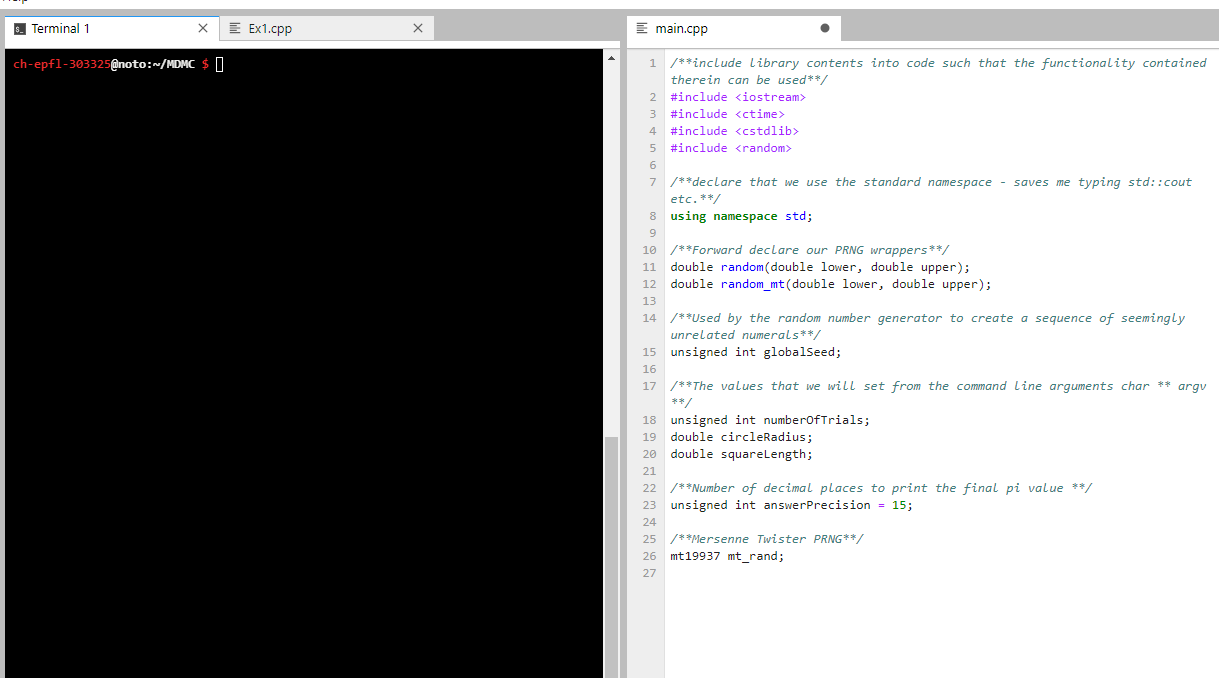
Remember to save the file. The files will be saved on your personalized EPFL storage.
This section will serve two purposes: to (re-)familiarise you with the C++ programming language, and also to guide you through the implementation of a \(\pi\)-estimation program using the MC method. In case that you are not familiar with C++ we recommend working with the python version.
In a directory of your choosing, create a main.cpp file and open it in a
text-editor. An entry-point for where your program should execute must
now be created. In your main.cpp file add the following:
#include <iostream>
#include <time.h>
#include <cstdlib>

double random(double lower, double upper);

unsigned int globalSeed;
unsigned int successfulHits = 0;
unsigned int numberOfTrials;
double circleRadius;
double squareLength;
unsigned int answerPrecision = 15;

using namespace std;

int main(int argc, char ** argv) {
    return 0;
}
This code will form the base of your MC method. The variables
numberOfTrials, circleRadius and squareLength are necessary for
the \(\pi\) estimation. The variable globalSeed is a requirement for our
pseudo-random number generator while the variable answerPrecision is
simply to ensure you print out an appropriate number of decimals for the
estimation. You can find a detailed description of libraries (iostream,
time, cstdlib), forward declaration, main functions, command-line
arguments, namespaces, global variables and variable scope in Section 1.5.2.
Below the main function, insert the following code.
double random(double lower, double upper) {
    double zero_to_one = (double) rand() / RAND_MAX;
    return (lower + (upper * zero_to_one));
}
This function returns a uniformly distributed random number. It makes
use of the PRNG rand(). The seed for this PRNG must also be
initialised so insert the following code within your main function:
srand(time(NULL));
For further information about seeds, using PRNGs and the functions
srand() and time(), see Section 1.5.2.2.2. Your goal is to estimate the value of \(\pi\) using
the circle and square method, thus the dimensions of the circle and
square must be parsed into your program, as well as the number of trials
you wish to perform this estimation with. This is achieved using the
functions atoi() and atof(). Place the following early within your
main function:
numberOfTrials = atoi(argv[1]);
circleRadius = atof(argv[2]);
squareLength = atof(argv[3]);
For more information about the functions atoi and atof, see
Section 1.5.2.3. You may also wish at this point to print
out these variables, to ensure that the the correct values are being
passed into the program. This can be achieved using the following
example:
cout << "Number of Trials" << numberOfTrials << endl;
The cout object is used to print a character stream to the terminal,
while the endl function flushes the stream. For further information
about using standard output within C++, see Section 1.5.2.4. You can now begin with the MC method.
Enter the following into your main.cpp file in an appropriate place
(i.e, once all variables are parsed, and the seed is set):
    for (int i = 0; i < numberOfTrials; i++) {
        // 1) Generate a new point (x,y) within the square.
        // 2) Test whether this new point resides within the circle.
        //      2.1) If above is true, increase the hit counter.
    }

    cout << "Successful hits: " << successfulHits << endl;
     double piEstimation = 0;
    //piEstimation = ??
    cout.precision(answerPrecision);
    cout << "Pi estimate: " << fixed << piEstimation << endl;
    return 0;
You may notice that the code is commented. This is intentional, as you must now modify this section of the code to produce a functioning \(\pi\) estimation program. Follow the steps in the comments and ask for help if you are stuck.
1.5.1. Compiling Your C++ Program
To compile the program, navigate your terminal focus to the directory
which contains main.cpp, and type the following:
g++ -std=c++11 main.cpp -o pi.x
This will produce an executable file called pi.x in your current
directory. You can execute this program using the following command-line
arguments:
./pi.x NumberOfTrials SizeOfCircle SizeOfSquare
1.5.2. C++ Glossary
1.5.2.1. Libraries, Forward Declaration, Main Function, Command-line Arguments, Namespaces, Global Variables and Variable Scope
1.5.2.1.1. Libraries
Libraries are pre-compiled code that contain useful functions for a
program to use. The iostream, time and C standard general utility
(cstdlib) libraries are included through the #include pre-process
directive. The #include pre-process directive tells the compiler that
you wish to include the contents of <library> into your source file
before it is converted to machine code, thus enabling you to use the
aforementioned functions in your program.
1.5.2.1.2. Forward Declaration
The double random(double lower, double upper) declaration is what is
known as a forward-declaration of a function and serves to inform the
compiler that this function is defined somewhere within your code.
1.5.2.1.3. Namespaces
The namespace std is the namespace in which the C++ standard library
functions are declared (standard input, standard output, random, string,
regex… etc). Namespaces are simply structures to prevent function
name conflicts.
1.5.2.1.4. Main Function
The main function is a special function which defines the point at which your program begins execution.
1.5.2.1.5. Command-line Arguments
The parameters argc and argv are special variables which are passed
to the program from the command-line as arguments. The variable argc
is an integer, while the variable argv is a pointer, which is an
address to some useful data within your computers memory. In this case
argc is simply a count of the number of arguments passed to the
program, while argv points to an 2-dimensional array of characters,
i.e the passed arguments themselves. It is worth noting that arrays in
C/C++ are represented in their true form: a pointer to the beginning of
the memory block at which the array starts. Thus, individual characters
passed to the program as command-line arguments can be accessed by
argv[i][j], where i is the index of the string being passed, and j
is the index of an individual character within the aforementioned
string.
1.5.2.1.6. Global Variables and Variable Scope
Variables can optionally be defined with access modifiers through the
keywords public, protected and private. These access modifiers change
the scope of a variable, i.e from where this variable can be acccessed
within the program. If no access specifier is present, as is the case
for the variables numberOfTrials, circleRadius and squareLength,
then the access specifier private is inferred. The public specifier
infers that the associated variable is accessible throughout the entire
program. The private specifier limits the scope of the variable to that
of the class in which it is defined, while the protected modifier
performs the same role except that it is also accessible from derived
classes. In this example you have only defined one class/file and hence
it is perfectly fine for you to not label the variables with an access
modifier. In contrast, variables defined within functions are only
accessible within that function.
1.5.2.2. Generating Random Numbers and PRNG Seeds
1.5.2.2.1. Generating Random Numbers
The <random> library provides many ways to generate pseudo-random
numbers but are overly complicated for your purpose. Instead, you use
the function rand() defined within the cstdlib library. The function
rand() is a pseudo-random number generator (PRNG) and returns a
uniformly distributed value between 0 and RAND_MAX. In this
implementation, the function rand() is wrapped with another function
random(double lower, double upper). Within this new function rand()
is first modified slightly to create a uniformly distributed random
number within the range [0, 1], and then this is applied to the lower
and upper parameters to create the desired domain distribution within
the bounds [lower, upper].
1.5.2.2.2. PRNG Seeds
The seed is an integer which rand() uses to generate a sequence of
pseudo-random numbers. Using the same seed will generate the same
pseudo-random number sequence. Since you are building a stochastic
model, it is most useful that the seed is unique every time your program
is run. The function srand(int) sets the seed for the rand() PRNG
and is defined in the <cstdlib> library. Here you pass to srand(int)
another function time(time_t *) which is defined in the ctime library
<ctime>. The argument of time(time_t *) allows you to calculate the
time passed between now and the time passed in to the function, through
the time_t type. However, you envoke the special case of
time(timer_t *), such that if the argument timer_t * is NULL, then
this function returns the number of seconds since the Epoch (defined as
00:00 hours, Jan 1, 1970 UTC). This number is a suitable seed for your
purposes, since your program should execute in a time period longer than
one second, hence your sequence of pseudo-random numbers should be
unique upon each calculation.
1.5.2.3. Library Functions
The function atoi(const char *) retrieves an integer from an input
string, while the function atof(const char *) performs the same but
for a floating point. These functions are defined in the <cstdlib>
library you import at the beginning of your code.
1.5.2.4. Standard Output
The cout variable is an object of class ostream. This represents the
standard output stream for narrow characters (and corresponds to the C
stream stdout). The standard output stream is the default destination
of characters determined by the enviroment, in this case, the terminal.
The operator << is an overloaded operator to provide the functionality
of pushing characters and strings to the stream buffer. Finally, the
endl function simply inserts a new line character and flushes the
stream. In other words, the line cout << "Hello" << endl; prints the
message “Hello” to your terminal.